Deleting A Response
In the M&E Monitor, users have the option to delete responses associated with indicators when necessary. The Delete Response feature allows users to remove outdated or irrelevant information while ensuring that data integrity is maintained through soft deletion.
Steps to Delete a Response
To delete a response for an indicator, follow these steps:
-
View Responses for the Indicator
- Navigate to the Indicators section and select the specific indicator for which you want to delete a response.
- Access the Responses section to view all responses related to that indicator.
-
Select the Delete Action
- On the right side of each response entry, there is a Select Action dropdown menu.
- Click on the dropdown to reveal the available actions.
-
Click "Delete Response"
- From the dropdown menu, select the "Delete Response" option.
- A confirmation dialog will appear, asking you to confirm the deletion.
-
Confirm Deletion
- In the confirmation dialog, carefully read the warning about deleting the response.
Confirm Delete Dialog
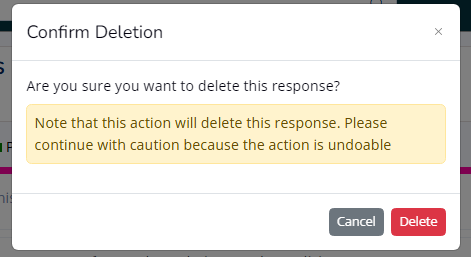
- Click the Delete button to confirm your decision. If you choose not to delete, you can close the dialog without taking action.
Important Notes
- Soft Deletion: Responses are soft deleted, meaning they are not permanently removed from the database. Instead, their status is updated to reflect that they are deleted, allowing for potential restoration in the future.
- Permissions: Only users with sufficient permissions can delete and restore responses. Ensure you have the necessary rights before attempting to delete a response.
Summary
The Delete Response feature provides users the ability to manage response data effectively. By using the soft deletion method, the M&E Monitor ensures data integrity while allowing users to remove outdated information when needed. Always confirm deletions carefully, and remember that responses can be restored if necessary by users with the appropriate permissions.