Create A Theory of Change
Listing Theories of Changes
The interface below shows how ToCs are displayed in the M $ E Monitor
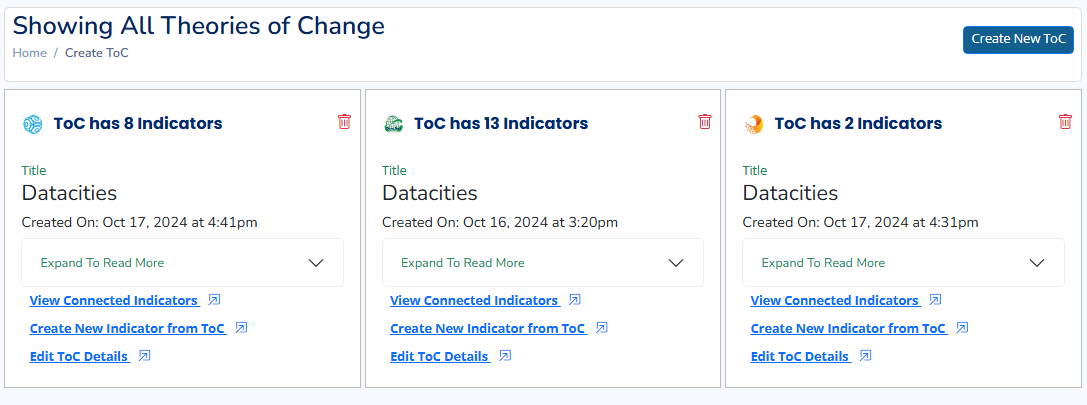
To be able to add a new Theory of Change (ToC), click the Create New ToC button on the right, a new interface will be presented to you and you will use it in the ToC creation Process.
Create your ToC Using This Form
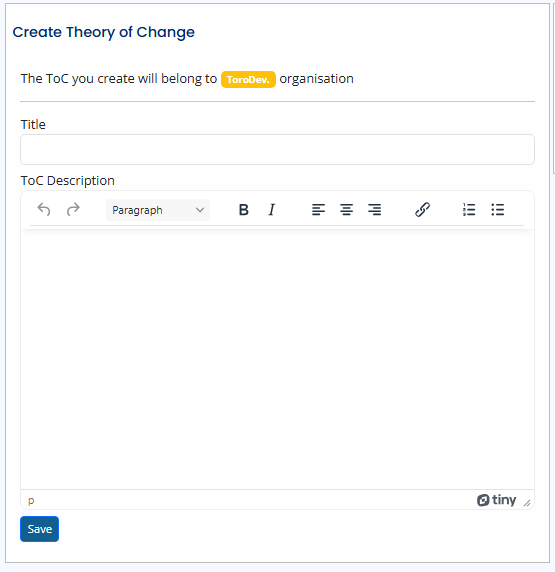
Provide a descriptive title for your Toc with a description. You can use the Editer to appy formating to your description. You can read through you text once again to correct any mistakes and then click the Save button
Theory of Changes(ToC) and Organisations
All Theory of Changes created in the M $ E Monitor are attached to the organisation of the user who is creating the Theory of Change(ToC).
You can go ahead and and Create New Indicators from the newly created ToC on the Listing Page. We shall review the process of creating indicators under Indicators section.