Progress Interpretation
The progress interpretation on the indicators listing page provides a visual representation of how each indicator is progressing towards its target. This is achieved through a graphical ruler that illustrates the relationship between the Baseline, Target, and Current State for each indicator.
Graphical Ruler Overview
The graphical ruler is used to depict progress for indicators with both increasing and decreasing directions:
- Baseline (Blue Mark): Represents the starting point of the indicator. It is the initial value from which progress is measured.
- Target (Red Mark): Represents the goal or desired value that the indicator aims to achieve.
- Current State (Green Mark): Represents the latest recorded value for the indicator, corresponding to the last response added.
Progress Shading
The shading on the graphical ruler visually indicates how the indicator is progressing relative to its baseline and target:
For Increasing Direction
- Progress is measured from the baseline (left) towards the target (right).
- The shaded area starts from the baseline and extends towards the current state.
- If the current state surpasses the baseline, the shaded area grows rightward towards the target, indicating positive progress.
- Any remaining area between the current state and the target is unshaded, indicating the distance left to reach the target.
For Decreasing Direction
- Progress is measured from the target (right) towards the baseline (left).
- The shaded area starts from the target and extends towards the current state.
- As the current state gets closer to the baseline, the shaded area increases leftward, representing progress made towards reducing the value.
- Any remaining area between the current state and the baseline is unshaded, indicating the remaining distance to reach the baseline.
Example Interpretation
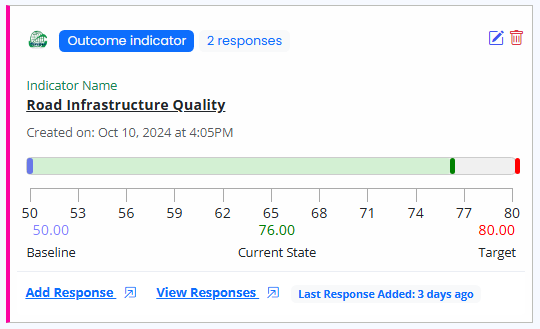
Indicator with Increasing Direction
- Baseline: 50 (Blue Mark)
- Target: 80 (Red Mark)
- Current State: 76 (Green Mark)
- Progress Shading: The shaded area extends from 50 to 76, indicating the progress made, while the area from 76 to 80 remains unshaded.
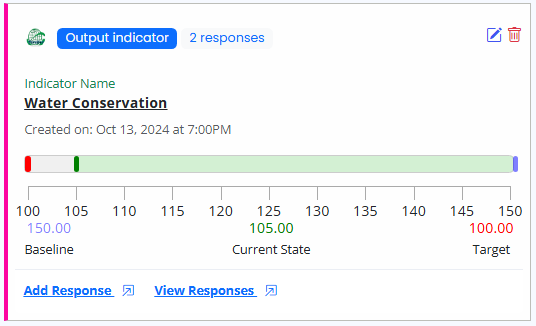
Indicator with Decreasing Direction
- Baseline: 150 (Blue Mark)
- Target: 100 (Red Mark)
- Current State: 105 (Green Mark)
- Progress Shading: The shaded area extends from 150 to 105, showing the reduction in value, while the area from 105 to 100 remains unshaded.
Visual Guide
The graphical ruler includes color-coded marks for easy identification:
- Blue Mark: Baseline value.
- Red Mark: Target value.
- Green Mark: Current state.
Users can quickly assess how close an indicator is to reaching its target and the direction of progress based on the shading pattern.
Conclusion
The graphical ruler on the indicators listing page provides an intuitive way to understand indicator progress by visually mapping baseline, target, and current state values. Progress shading helps users quickly grasp the extent to which an indicator is progressing towards its target, accommodating both increasing and decreasing directions.